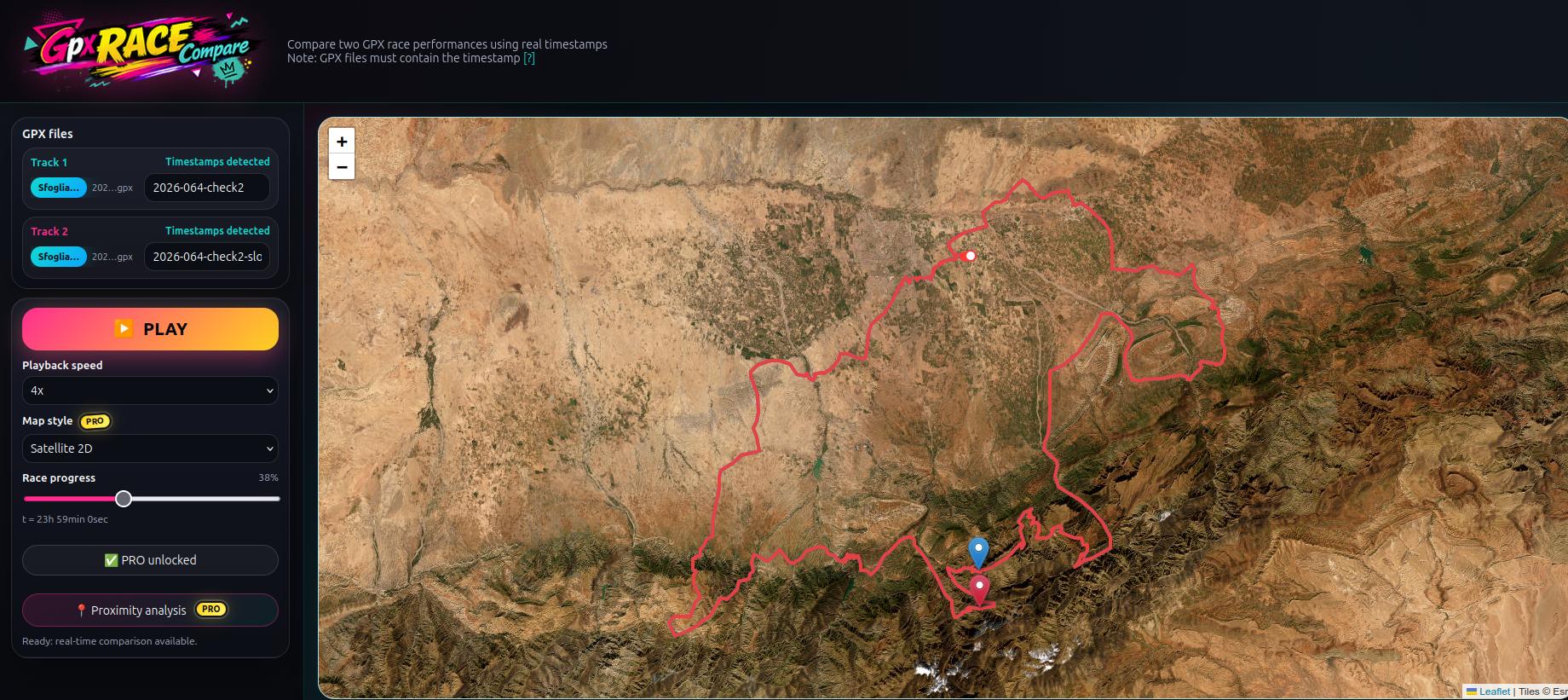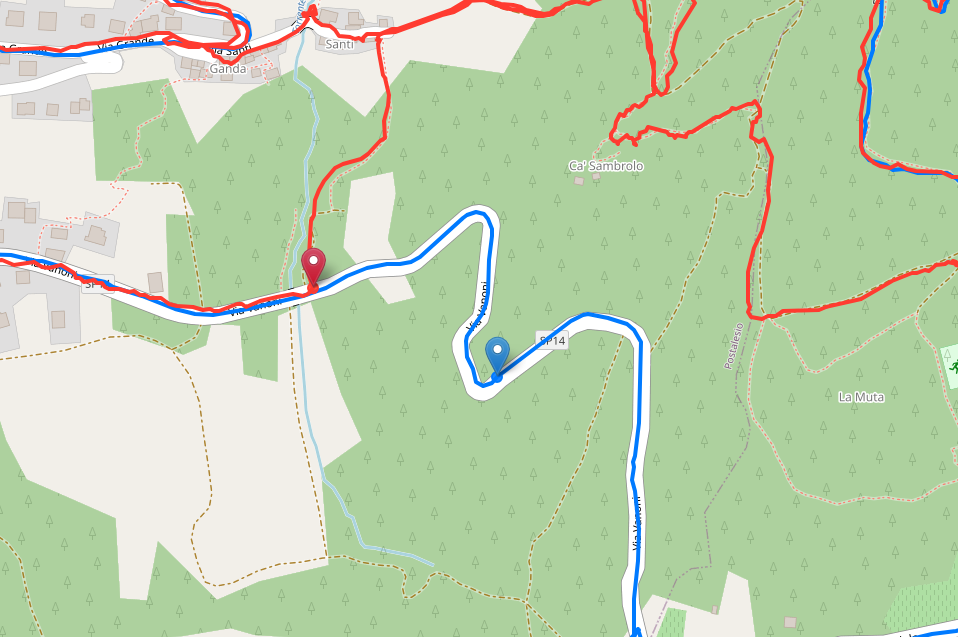
Segment Battle: compare two GPX tracks side-by-side on the same route segment
- Mtb life
- November 23, 2025
Segment Battle is a lightweight web app designed for runners, cyclists, trail runners and coaches who use GPX tracks and want to compare two activities on the same segment of a route.
VIDEO
Instead of only checking final times or rankings, Segment Battle lets you:
- overlay two GPX tracks on the same map
- start both athletes at the same point on the chosen segment
- see where one gains, loses or recovers seconds
- analyze in detail time gaps, recoveries and pacing differences
It’s ideal for anyone who records workouts with a GPS watch or cycling computer and wants a clear, visual tool to compare two GPX files from the same route.
Compare GPX tracks on the same segment
The core idea is simple: two GPX files, one shared segment, a visual comparison.
With Segment Battle you can:
- upload two different GPX files, even from different days or devices
- select the part of the route you want to analyze (for example: climb only, descent only, middle section)
- align both athletes so that they start from the same point of the segment
- choose between:
- constant-speed mode (point steps)
- real-time mode based on GPX timestamps
This way you don’t compare only the final time, but also the how and where differences occur along the route.
How Segment Battle works
The workflow is designed to be very simple:
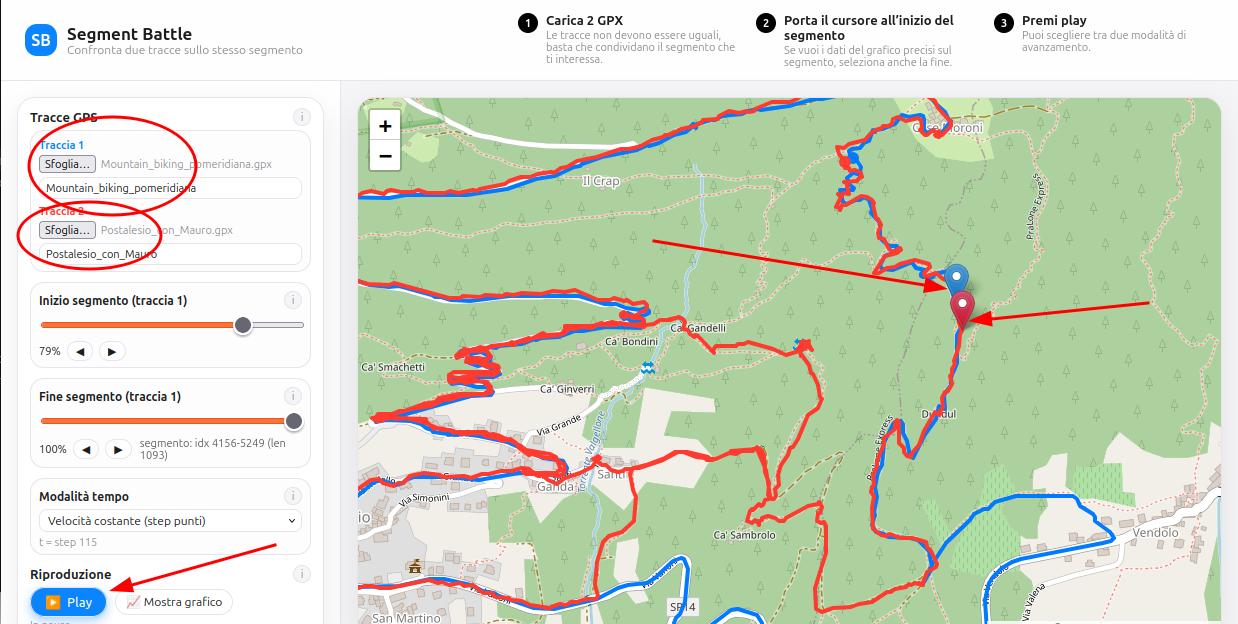
Upload 2 GPX files
Works with running, cycling, trail running or any GPS-recorded activity.Select the start and end of the segment
Use the sliders to choose exactly the part you want to analyze (e.g. climb only, descent only, last kilometer).Choose the playback mode
- Real-time GPX mode, if you want to respect the exact recorded timings
- Constant-speed mode, for a smoother visual comparison
Press play and watch the map
The blue and red markers start together, showing:- where one athlete gains time
- where the other recovers
- how they move through turns, climbs or downhill sections
Open the comparison chart
The popup chart shows:- cumulative time on the segment for each athlete
- time difference in minutes and seconds over the entire segment
Use cases: when Segment Battle is truly useful
Comparing two workouts on the same route
- You ran the same loop on two different days and want to see if you improved.
- You want to understand if you paced better on the climb or the descent.
- You want to see exactly where you lost the most time, turn by turn.
Comparing two athletes on the same segment
- Two teammates ride or run the same climb on different days.
- You want to see who accelerates earlier, who exits corners better, who holds the pace more consistently.
- Perfect for coaches and trainers who need a visual and objective comparison.
Equipment or setup testing
- Test two sets of wheels, two shoes or two bike setups on the same course.
- Record two GPX tracks and compare them on a key segment (climb or descent).
- See where the new equipment helps you gain real seconds.
Quick instructions for using Segment Battle
- Upload the two GPX files They don’t need to be identical: they just need to share the segment you want to analyze.
- Select the segment Use the start/end sliders to choose the exact part of the route. Both playback and charts will focus on this section only.
- Choose the time mode - “Constant speed (point steps)” for a simple comparison - “Real time from GPX” to use actual recorded timings
- Press play Watch how the two markers move and how time gaps evolve second by second.
- Open the chart Use “Show chart” to see cumulative time and the evolving time gap along the segment.
FAQ about Segment Battle
Do the two GPX tracks need to be identical?
No. They only need to share the segment you want to compare. The rest of the route can be different.
Can I use Segment Battle with GPX exported from Strava, Garmin, Suunto, Coros?
Yes, as long as the file is in GPX format and contains GPS points. For real-time mode, timestamps must also be included.
What if the GPS points don’t match perfectly?
The app automatically aligns the start point of the segment by finding the closest GPS point on the second track. Small GPS inaccuracies are not a problem.
Is Segment Battle free?
Yes. The current version is a lightweight, free tool that works directly in your browser with no registration required.
Do I need timestamps in the GPX file?
Only if you want to use the “Real time from GPX” mode. Otherwise, you can always use constant-speed mode.
Why Segment Battle is different from a simple ranking
Compared to a classic leaderboard or total segment time, Segment Battle lets you:
- see how the time was achieved, not just the final number
- understand where each athlete is stronger (power, pacing, downhill technique)
- visualize gaps in a way that is extremely effective for:
- technical analysis
- athlete feedback
- videos and presentations
It’s a tool for anyone who wants to go beyond “I ran it in 4:35” and instead see how two GPX tracks really behave on the same segment.
Who can benefit from Segment Battle
Segment Battle is valuable for:
- road runners training on repeated loops
- trail runners analyzing climbs and technical descents
- cyclists and MTB riders comparing climbs, descents, Strava segments
- coaches and trainers working with GPS/GPX data
- creators and YouTubers visualizing real-world duels and time gaps